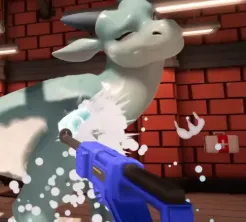
Input & wash loop

Drag'n Wash Controls and Tools

Run the wash loop smoothly on keyboard or controller, use Options comfort toggles, scout missed dirt when the clean bar stalls, and know where Unstick Kobold lives on the pause menu.

Last reviewed:

Controller and Input Support

Steam categories list full controller support for Drag'n Wash. Most Drag'n Wash controls questions start there. That makes a pad a first-class option on Windows, macOS, and Linux builds distributed through Steam or itch, including Steam Deck Verified play per official September 15, 2026 Steam news. Connect your controller before launching if you want the game to detect it cleanly on the first visit.

Open the in-game Options or rebind screen for your build’s actual mappings, then bind wash, camera, confirm, and menu actions to whatever is comfortable for long orbits around a dragon. Static third-party key charts drift across patches.

The official Kobold Hotfix Steam news (September 13, 2026) adds Invert Look Y / invert-Y mouse options and Sprayer Reduce Motion under Options. Use those if look direction or sprayer motion comfort is fighting you during long washes.

Good Drag'n Wash controls setup is boring on purpose: reliable camera orbits, comfortable confirm/cancel, and no fighting the stick while you hunt a last dirt speck. Spend two minutes in Options before your first paid visit so you are not rebinding mid-prompt.

Options Worth Checking

Confirmed in the official Kobold Hotfix Steam news (September 13, 2026).

Unstick Kobold on the pause menu is for stuck play states. Itch comments still warn against selecting unstuck kobold during credits, where experimental menu choices have softlocked players. Use pause-menu recovery during visits; use backups around credits.

Comfort and recovery options
Option / toolWhereWhy it helps
Invert Look YOptionsFlips vertical look if camera orbits feel inverted
Sprayer Reduce MotionOptionsReduces sprayer motion discomfort during washes
Unstick KoboldPause / game menuRecovery tool when you are stuck during play

Wash Tool Loop Habits

Tools exist to support cleaning and comfort, not a deep crafting tree.

Official framing is soap-and-wash service work: you clean, chat, and tend requests as comfort grows. In practice that means selecting the appropriate wash tools as the visit presents them, covering the model systematically, and switching focus when a prompt appears.

Work in passes. First pass: large surfaces you can see head-on. Second pass: sides and underside angles. Third pass: detail areas that itch comments flag as finish blockers—tail ink, back of the neck, and other easy-to-miss patches. Tool swapping mid-pass is fine; leaving entire angles untouched is what stalls jobs.

When a personal request interrupts the wash, resolve the highlighted ask, then return to cleaning. Out-of-order request completion is a community-reported softlock pattern on later Conrad visits, so treat prompts as part of the control flow.

Keep Drag'n Wash tool swaps deliberate: finish a sector, then change tools, then resume the orbit. Random swapping is how players lose track of which flank still needs soap.

  1. 1

    Lock a stable camera distance

    Pick a distance where soap coverage and dirt reads are both visible. Re-center if the model fills the frame too tightly to see edges.

  2. 2

    Orbit on purpose

    Move around the dragon in consistent clockwise or counterclockwise loops so you know which sectors you already cleaned.

  3. 3

    Detail-scout before forcing a finish

    If the clean bar looks done, do one more slow scout of tail, neck back, and ink before assuming a bug.

Clean Bar Troubleshooting

A full-looking clean bar that will not complete the job is the top mechanical complaint in itch comments. The usual cause is missed dirt rather than a broken meter.

If scouting fails twice, reload an earlier save and repeat with slower orbits. Combine this checklist with the beginner guide’s first-wash steps when you are still learning model silhouettes.

Most “broken meter” reports in Drag'n Wash controls threads resolve after a slower third pass. Treat the checklist as muscle memory before you file a bug or reinstall.

Clean bar stuck checklist
CheckWhy it matters
Tail ink / patterned tail areasEasy to overlook from front cameras
Back of the neckOften behind your default view
Both flanks after a height changeVertical camera shifts hide strips of dirt
Restart job then re-scoutFresh pass reveals leftovers faster
Unresolved request promptVisit may be waiting on order-sensitive asks

Credits Menu and Recovery Cautions

Controls are not only about washing. Community reports say selecting unstuck kobold during credits can softlock. After an ending, prefer known-good menu exits and rely on backup saves instead of experimental credits options.

Likewise, continuing a finished slot may throw you back into credits. That is a save-planning issue as much as a controls issue—keep pre-credits backups when you still intend to branch.

Put differently: the riskiest Drag'n Wash “button” late in a run is often a credits menu curiosity, not a wash tool. Finish, quit cleanly, and reload a named backup when you are ready for the next route.

Session Control Checklist

A short pre-visit pass that prevents most input frustration.

Treat Drag'n Wash controls like hygiene for every Drag'n Wash session for a ninety-minute ending: fix camera comfort first, then wash discipline, then menu caution after credits. Skipping the first step is how players blame tools for missed dirt.

Two-minute setup

Before a serious route attempt, confirm the pad or keyboard is detected, open Options for Invert Look Y or Sprayer Reduce Motion if you need them, and do one practice orbit so stick speed matches how you scout tails and neck backs.

  • Connect the controller before launch when using a pad
  • Check rebinds for wash, camera, confirm, and cancel
  • Enable Invert Look Y or Sprayer Reduce Motion if needed
  • Remember Unstick Kobold is on the pause menu during play
  • Keep a non-experimental exit habit after credits

Sources

Primary references used for this page. Official store facts and patch notes are separated from itch comment troubleshooting.

Prefer these pages when a patch changes options, softlock behavior, or mod install steps. Label community comments as player reports until an official note confirms them.

Common questions

Frequently Asked Questions

Does Drag'n Wash support controllers?

Yes. Steam lists full controller support. Check in-game Options for your device and rebinds.

Where do I invert look or reduce sprayer motion?

Open Options. Invert Look Y and Sprayer Reduce Motion are documented in the official Kobold Hotfix Steam news (September 13, 2026).

Where is Unstick Kobold?

On the pause / game menu for stuck play states per the Kobold Hotfix. Avoid experimental unstuck choices during credits, which players still warn can softlock.

What should I do if cleaning tools will not finish the job?

Scout missed dirt—especially tail ink and the back of the neck—restart the job if needed, and make sure no personal request prompt is waiting out of order.

Are VR controls official?

No. Native VR is not listed on official store pages. Community VR adds its own workflow; see the VR mod page for F10/F11 notes and launch flags.

Continue exploring

Related Guides